

Overview
A typical SmartNews Ads campaign can contain a depth of audience insights that isn’t captured by the numbers alone. Smart Personas help you make sense of the data by turning your engagement data into AI-generated audience personas. There’s no need to export CSV data or design your own prompts. SmartNews does it for you automatically every month.
Smart Personas reports are clear and informative, helping you plan your targeting categories and creative decisions.
Disclaimer
- Smart Persona reports are generated by an AI language model using statistical information.
- SmartNews does not guarantee the accuracy or completeness of the report content.
- Advertisers must review report content before using it, including for ad delivery or other campaign decisions.
- Advertisers are responsible for confirming:
- compliance with applicable laws and regulations;
- that no third-party rights are infringed;
- compliance with the SmartNews Ads Targeting Policy
- We encourage you to use these reports as an illustrative marketing tool, rather than a robust diagnostic of your account’s audience. When making important campaign decisions, please download your raw campaign report data and double-check the insights in these reports against your actual data.
How it works
Smart Personas are only available for Standard Ads with the following campaign objectives:
| Supported campaign objectives | Reach requirement |
|---|---|
| Awareness objectives | 1,000 unique users |
Generation timing
For eligible accounts, Smart Persona reports are generated sequentially starting from the first Monday of each month. Reports are also generated sequentially starting from the first Monday following a campaign’s scheduled end date.
Features
- Automatic report generation at the beginning of each month and/or after a campaign ends.
- Create personas for individual campaigns or for your entire account.
- Glean interests, hobbies, and general lifestyle characteristics at a glance.
- Track which article context categories are most likely to resonate with each persona with affinity mapping.
Accessing Smart Personas
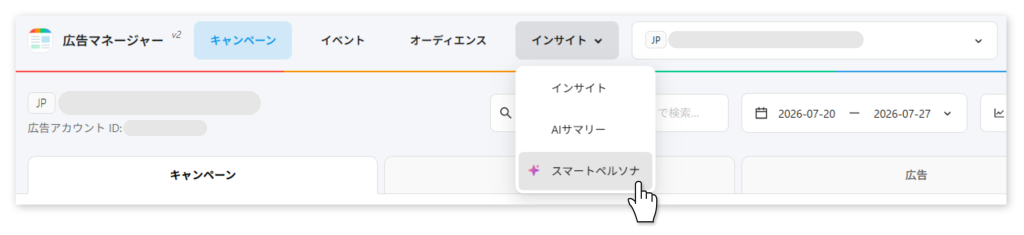
You can find Smart Personas under the [Insights] tab on the main Ads Manager screen.
Ad account personas
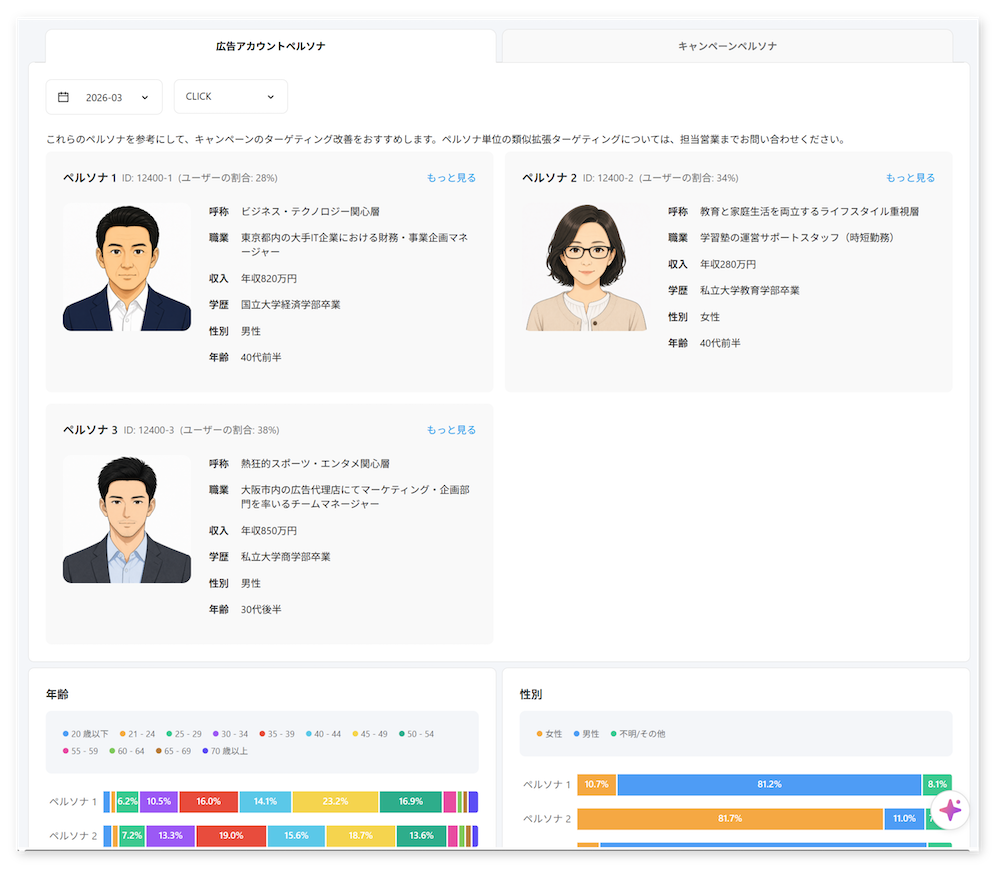
The 「広告アカウントペルソナ」tab generates personas aggregated from all campaigns under the account.
Campaign personas
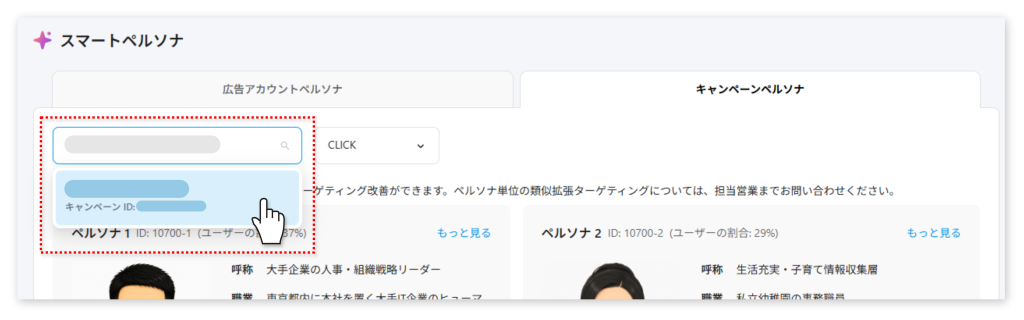
The 「キャンペーンペルソナ」tab allows you to search and select individual campaigns from the top-left search field from which to generate personas. Only campaigns with enough engagement data from which to generate personas will be selectable.
Select report period and persona type
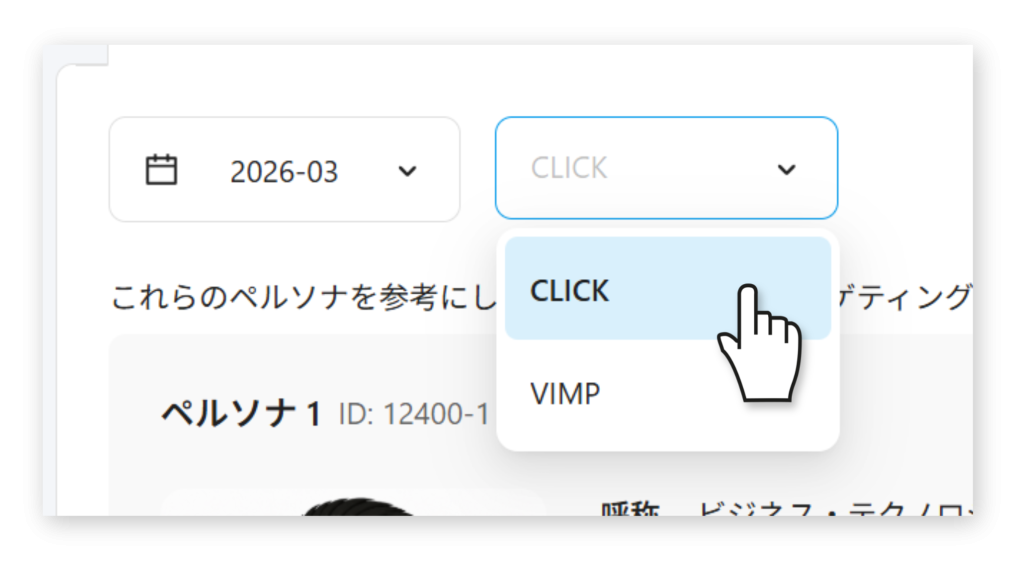
In the top-left corner of the report, you can choose the month you want to review and whether personas are based on clicks or viewable impressions (VIMP).
CLICK personas are generated from the audience data of people who engaged most with your ads, but they may have less data to work with than VIMP-generated personas, which are generated from all people who viewed your ads.
Persona insights
Pressing [もっと見る]in the top-right corner of each persona card opens a detailed breakdown of data unique to your SmartNews audience grouped under this persona.
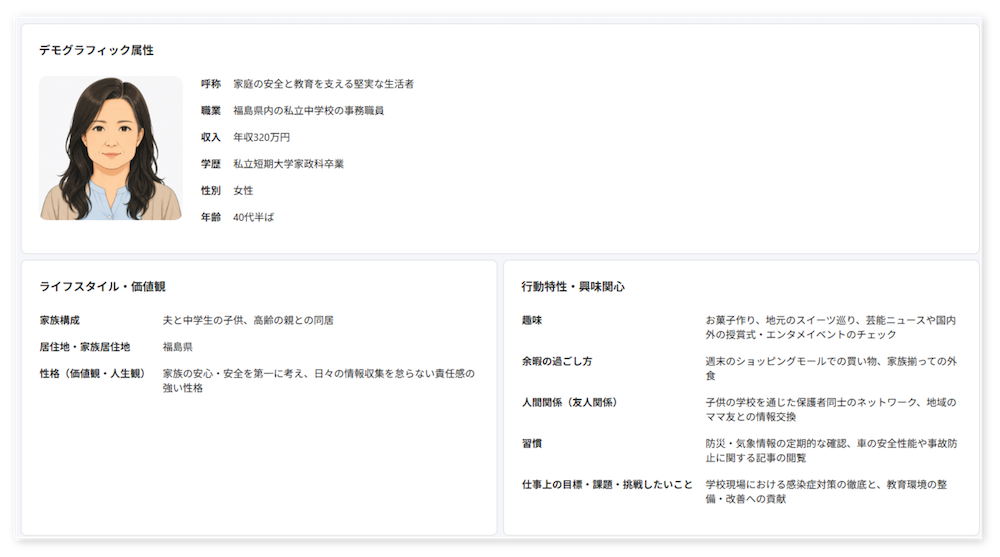
Demographic data
To help inform marketing and future creative decisions, the persona biographic data aims to paint a representative picture of users grouped in this persona. Reading patterns offer insight into what this persona values and what holds their attention.
Note
- Demographic data extrapolated from reading patterns and ad engagement is meant for illustrative purposes only and is not a substitute for real market research or user interviews.
- Personas depicting minors (users 19 and under) are not generated or displayed.
Article category context clustering
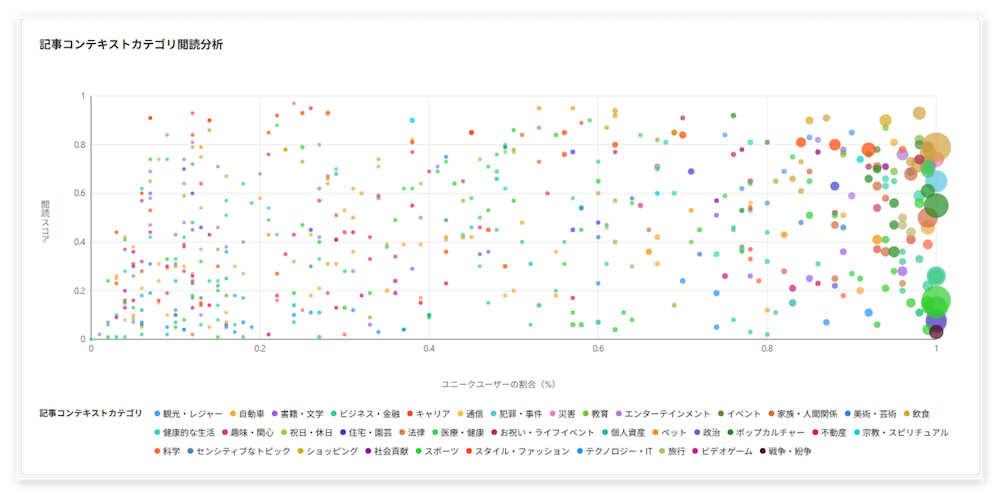
In this section, you can see which article categories this persona is most likely to read. Circle size indicates the relative size of each category cluster. Larger circles mean more users engaged with that category compared with others.
You can use these insights to directly inform which article categories to target when setting up your ad groups.
X axis (Unique user percentage)
Shows the percentage of unique users in the persona who viewed each category. Circles farther left indicate fewer readers, while circles farther right indicate more readers.
Y axis (Affinity score)
Indicates how much more (or less) this persona reads the category compared with the SmartNews average. Clusters near the bottom reflect more typical behavior, while clusters higher up highlight interests that are more distinctive to the persona.
Data tables
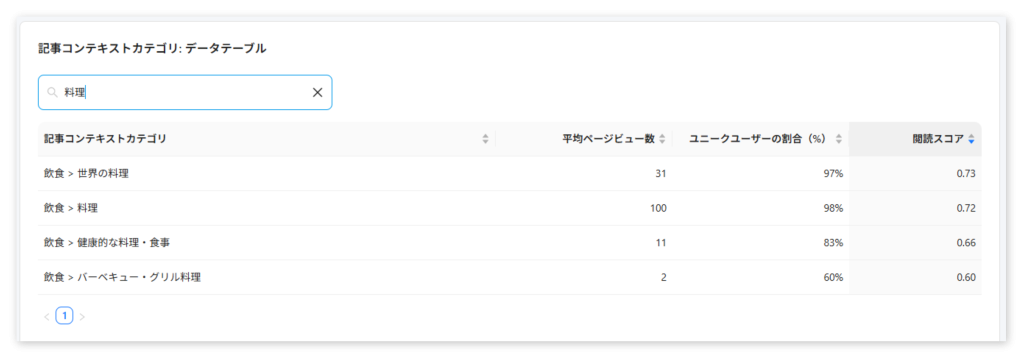
This section lets you search for specific categories and compare affinity scores and unique user percentages with SmartNews averages. Enter a search term in the top-left search field to filter categories.
You can also use the arrows in each column to sort categories and quickly find the highest or lowest affinity for this persona.
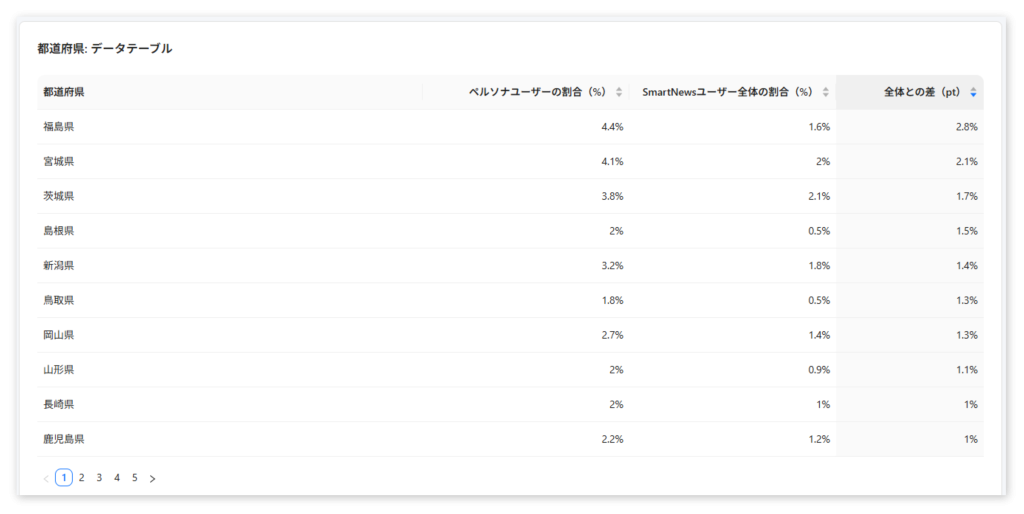
The prefectural data table breaks down where people in this persona are over or under-represented compared with the overall population.
FAQ
Q: Why can’t I see any personas?
A: Smart Personas are only generated for ad accounts with at least 1,000 unique user engagements.
If your account meets this threshold but you still don’t see any reports, this month’s report may not have been generated yet. Reports are generated on the first Monday of each month and on the first Monday after an ad campaign finishes its scheduled run.
Q: How many personas are generated?
A: The number of personas depends on the report type and objective:
Viewable impression-based reports: up to 5 personas
Click-based reports: up to 3 personas
Q: How long are Smart Personas reports available?
A: Both account-level and campaign-level reports are retained for one year from the creation date, after which they are automatically purged.
Q: Can I download my persona report data locally?
A: The ability to export persona reports is not currently supported.
Q: Is Smart Persona available for Premium Ads campaigns?
A: Please consult with your sales reprensentative regarding the Premium Ads.