

SmartNews Ads allow you to schedule your campaigns to only run during certain hours in the week. This features is available on all ad accounts and for all campaign objectives.
Schedule ads to run on specific days
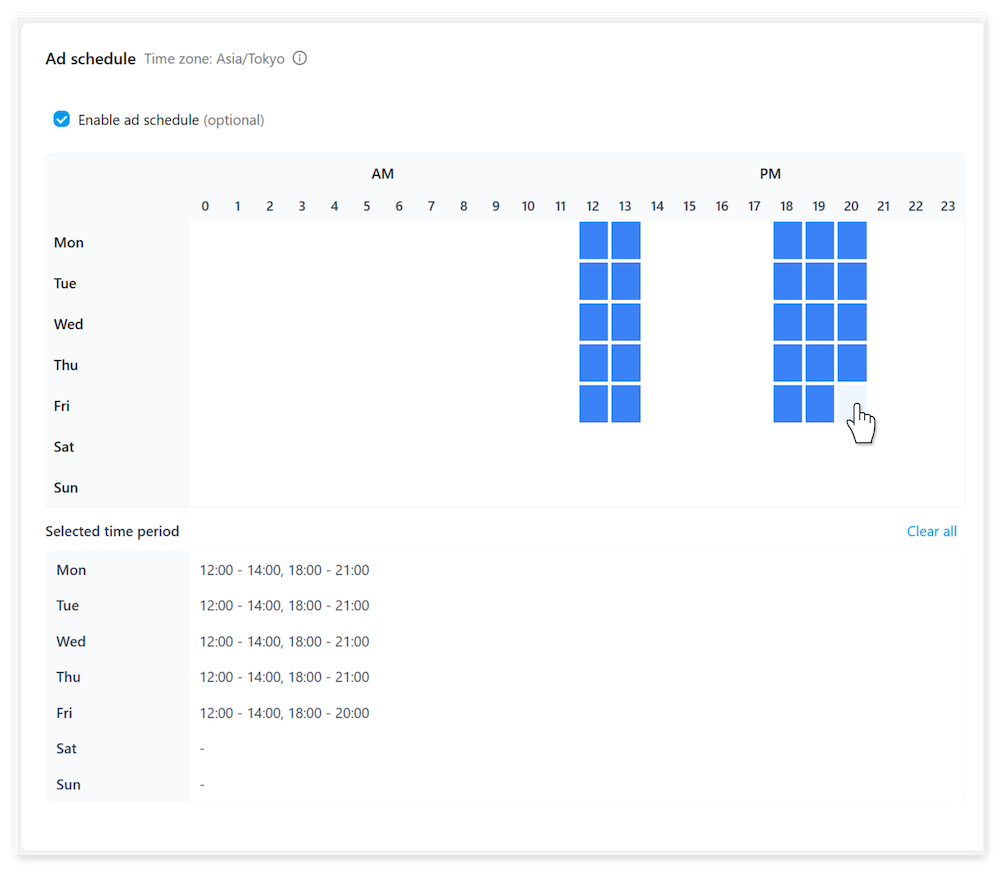
Enabling ad scheduling can be done from the campaign level.
1When creating a new campaign or editing an existing one, select [Show more options] > [Enable ad schedule].
2Select the hour time blocks in the week during which the campaign will run. Clicking a selected block will deselect it.
Be aware
- Using narrow scheduling windows can significantly limit your campaign’s reach and performance.
- SmartNews will try to spend your daily budget within your selected schedule.
However, during high-demand times, fewer auctions may be available for bidding, potentially causing your campaign to underspend compared to campaigns running throughout the week. - Ad scheduling operates based on your ad account’s registered time zone. When targeting audiences in different time zones, be sure to adjust your scheduling windows accordingly.
FAQ
Q: Can I change the time zone used for scheduling?
A: The time zone used for ad scheduling is currently fixed to your ad account’s registered time zone. It’s not currently possible to manually change the time zone used for scheduling.
Q: How does ad scheduling affect my daily budget?
A: Ad scheduling makes no changes to your selected daily budget. You may find that campaigns using ad scheduling underspend slightly compared to 24/7 campaigns if you schedule narrow or highly competitive time windows.